
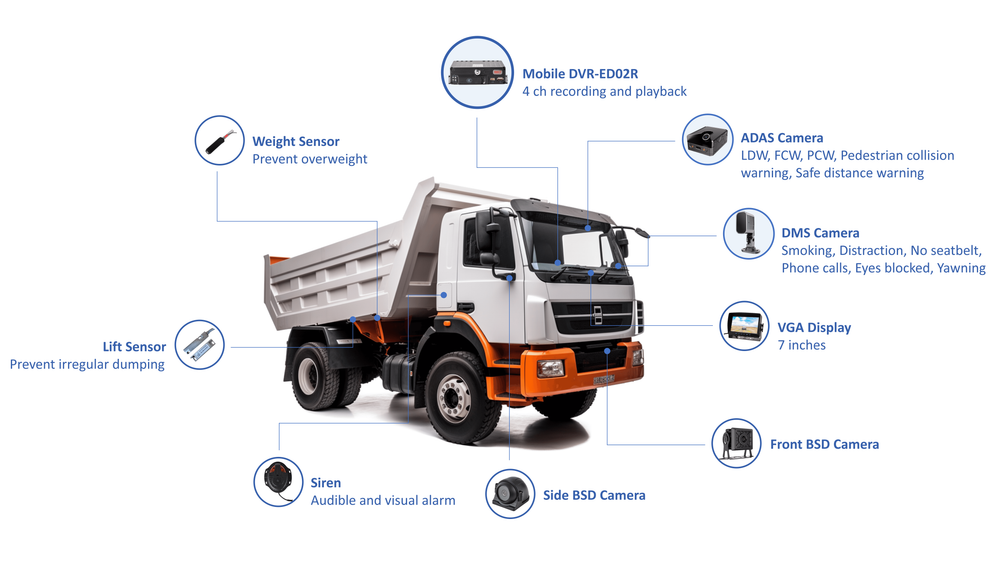
Facing the real problem
Most fleets know the pain: drivers blamed for incidents they didn’t cause, routes that eat fuel, and a mountain of GPS dots that tell you where trucks went but not what happened inside the cab. Start by treating the problem, not the gadget. Combine location tracking with visual, AI-driven context — an AI dashcam that flags risky events and links them to GPS fixes removes the guesswork. From advising fleets for over a decade and seeing installations along the I-95 corridor, I’ll show a problem-first checklist that cuts confusion and brings measurable outcomes.
Top problems this checklist must solve
– Missed context: positional data without video leaves investigations incomplete. – False claims and liability exposure: no clear footage means longer disputes. – Data overload: endless logs, no signal. – Poor integration: dashcams that don’t talk to your GPS or TMS create silos. – Driver resistance and privacy worries. These are the precise faults your rollout must target; each step below is mapped to one or more of these problems.
Pre-implementation essentials
1) Define outcomes first — fewer at-fault incidents, faster claims resolution, or cleaner route adherence. Pick one primary metric. 2) Inventory assets — list truck models, years, on-board power specs, and existing telematics. 3) Bandwidth check — test mobile coverage on core routes; poor coverage needs offline buffering tiers. 4) Hardware selection — choose devices proven for heavy trucks, rugged mounts, and good low-light cameras. Consider a truck AI dashcam option that supports edge AI so events tag before upload. 5) Integration plan — map how GPS, dashcam video, and your TMS/ERP will share IDs and timestamps. Prefer solutions that push unified event packets, not separate feeds. 6) Data policy and retention — decide retention windows, who can view footage, and audit logs. Follow local regulations and union agreements. 7) Pilot scope — pick 5–20 trucks that represent your worst routes, busiest drivers, and one clean control group.
Pilot execution checklist
– Install on pilot trucks with standardized mounting and power isolation to avoid electrical issues. – Configure event thresholds (hard braking, lane departure) at conservative sensitivity; tune after 1 week. – Train drivers in short, respectful sessions; explain benefits and privacy rules. Keep sessions under 20 minutes. – Test end-to-end: trigger an event, confirm video links to GPS point and shows in the dashboard within expected latency. – Capture KPIs for 30 days: number of flagged events, percent with clear context, average claim resolution time, driver feedback. Stop the pilot only after the data shows directionally better decisions, not just fewer alerts.
Common pitfalls and how to avoid them
– Too many false positives: reduces trust. Start with low sensitivity and raise it. – Bad mounts and poor power wiring: causes footage gaps. Use professional installers and bench-test power draws. – Separate vendor silos: insist on common timebase (UTC) and consistent vehicle IDs. – Ignoring driver privacy: document access rules and keep short, transparent retention. – No ongoing tuning plan: schedule quarterly reviews of event thresholds and firmware. Small tweaks beat wholesale replacements.
Operational rollout checklist
– Scale by cohorts: 10–30% of fleet per month, with installation teams and a spare-device pool. – SOPs: create clear incident workflows — who reviews footage, who escalates, time limits to act. – KPIs to monitor continuously: incident rate per 100k miles, mean time to close a claim, footage availability rate. – Maintenance: assign monthly health checks for camera connectivity and GPS lock. Replace devices failing >2% of checks. – Contract terms: demand firmware update cadence, remote diagnostics, and defined SLA for device failure replacement.
Privacy, compliance, and legal anchors
Be direct: record only what you need. Keep driver access simple and logged. Retain footage according to local laws and carrier insurance requirements. Keep a named compliance owner who signs off on any subpoena or insurer request. Train your HR and safety teams to use footage for coaching first, discipline second.
Quick timeline and expected results
Week 0–2: planning, hardware order, route coverage test. Week 3–6: pilot installs, driver sessions, tuning. Week 7–12: pilot evaluation and rollout plan. 3–6 months post-rollout: expect measurable drops in disputed claims and faster claim resolution; fleets often see clearer incident context within days and steady KPIs improvement by quarter two.
Final notes — the practical endgame
You want fewer blind spots and faster, evidence-driven decisions. Follow the checklist, keep pilots practical, tune thresholds with drivers, and keep data rules simple. The payoff is concrete: less time spent arguing over what happened, clearer coaching conversations, and stronger operational control — outcomes that BSJ has helped fleets realize through tested hardware and integration approaches, not slogans. BSJ fits into that flow as a technical partner that supports the steps above without adding noise.